── Attaching core tidyverse packages ──────────────────────── tidyverse 2.0.0 ──
✔ dplyr     1.1.4     ✔ readr     2.1.5
✔ forcats   1.0.0     ✔ stringr   1.5.2
✔ ggplot2   4.0.0     ✔ tibble    3.3.0
✔ lubridate 1.9.4     ✔ tidyr     1.3.1
✔ purrr     1.1.0
── Conflicts ────────────────────────────────────────── tidyverse_conflicts() ──
✖ dplyr::filter() masks stats::filter()
✖ dplyr::lag()    masks stats::lag()
ℹ Use the conflicted package (<http://conflicted.r-lib.org/>) to force all conflicts to become errors
library(mosaic) # Our all-in-one package
Registered S3 method overwritten by 'mosaic':
  method                           from
  fortify.SpatialPolygonsDataFrame ggplot2

The 'mosaic' package masks several functions from core packages in order to add
additional features.  The original behavior of these functions should not be affected by this.

Attaching package: 'mosaic'

The following object is masked from 'package:Matrix':

    mean

The following objects are masked from 'package:dplyr':

    count, do, tally

The following object is masked from 'package:purrr':

    cross

The following object is masked from 'package:ggplot2':

    stat

The following objects are masked from 'package:stats':

    binom.test, cor, cor.test, cov, fivenum, IQR, median, prop.test,
    quantile, sd, t.test, var

The following objects are masked from 'package:base':

    max, mean, min, prod, range, sample, sum
library(skimr) # Looking at data
Attaching package: 'skimr'

The following object is masked from 'package:mosaic':

    n_missing
library(janitor) # Clean the data
Attaching package: 'janitor'

The following objects are masked from 'package:stats':

    chisq.test, fisher.test
library(naniar) # Handle missing data
Attaching package: 'naniar'

The following object is masked from 'package:skimr':

    n_complete
library(visdat) # Visualize missing datalibrary(tinytable) # Printing Static Tables for our data
Attaching package: 'tinytable'

The following object is masked from 'package:ggplot2':

    theme_void
Attaching package: 'crosstable'

The following object is masked from 'package:purrr':

    compact
library(CardioDataSets)library(vcd)
Loading required package: grid

Attaching package: 'vcd'

The following object is masked from 'package:mosaic':

    mplot
library(ggformula)library(infer)
Attaching package: 'infer'

The following objects are masked from 'package:mosaic':

    prop_test, t_test
library(broom) # Clean test results in tibble formlibrary(resampledata) # Datasets from Chihara and Hesterberg's book
Attaching package: 'resampledata'

The following object is masked from 'package:datasets':

    Titanic
library(openintro) # More datasets
Loading required package: airports
Loading required package: cherryblossom
Loading required package: usdata

Attaching package: 'openintro'

The following object is masked from 'package:mosaic':

    dotPlot

The following objects are masked from 'package:lattice':

    ethanol, lsegments
library(visStatistics) # One package to rule them alllibrary(ggstatsplot)
You can cite this package as:
     Patil, I. (2021). Visualizations with statistical details: The 'ggstatsplot' approach.
     Journal of Open Source Software, 6(61), 3167, doi:10.21105/joss.03167
Rows: 40 Columns: 3
── Column specification ────────────────────────────────────────────────────────
Delimiter: ","
chr (2): Name, Gender
dbl (1): Total_Expenditure_Last_Week

ℹ Use `spec()` to retrieve the full column specification for this data.
ℹ Specify the column types or set `show_col_types = FALSE` to quiet this message.
money_modified
# A tibble: 40 × 3
   name      gender total_expenditure_last_week
   <chr>     <chr>                        <dbl>
 1 Radha     Female                        2000
 2 Prerana   Female                        1200
 3 Chris     Male                         15000
 4 Nireeksha Female                        3620
 5 Supraj    Male                           560
 6 Adit      Male                          2200
 7 Shweta    Female                        1500
 8 Diya      Female                        1206
 9 Kshama    Female                        1400
10 Savannah  Female                        2500
# ℹ 30 more rows
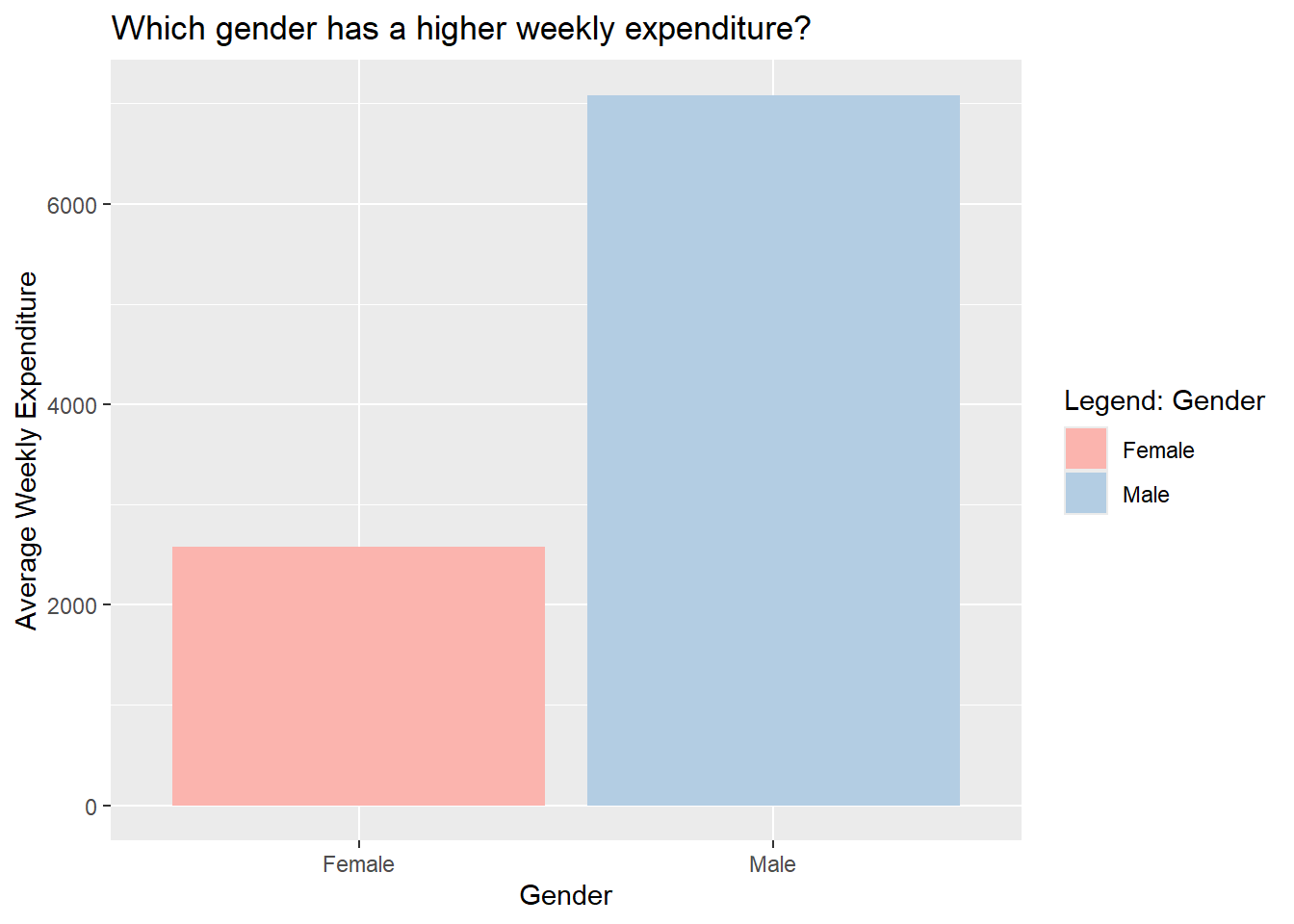
While we surveyed people and told them our objective, a lot of them assumed that women would have a higher weekly expenditure. But clearly, from the data we can tell that men have a much higher average weekly expenditure than women.
One of the men we surveyed mentioned that he bought an electronic device the previous week, which is why his expenditure was so high (50,000). Perhaps if we had surveyed different men, the data would be comparable.
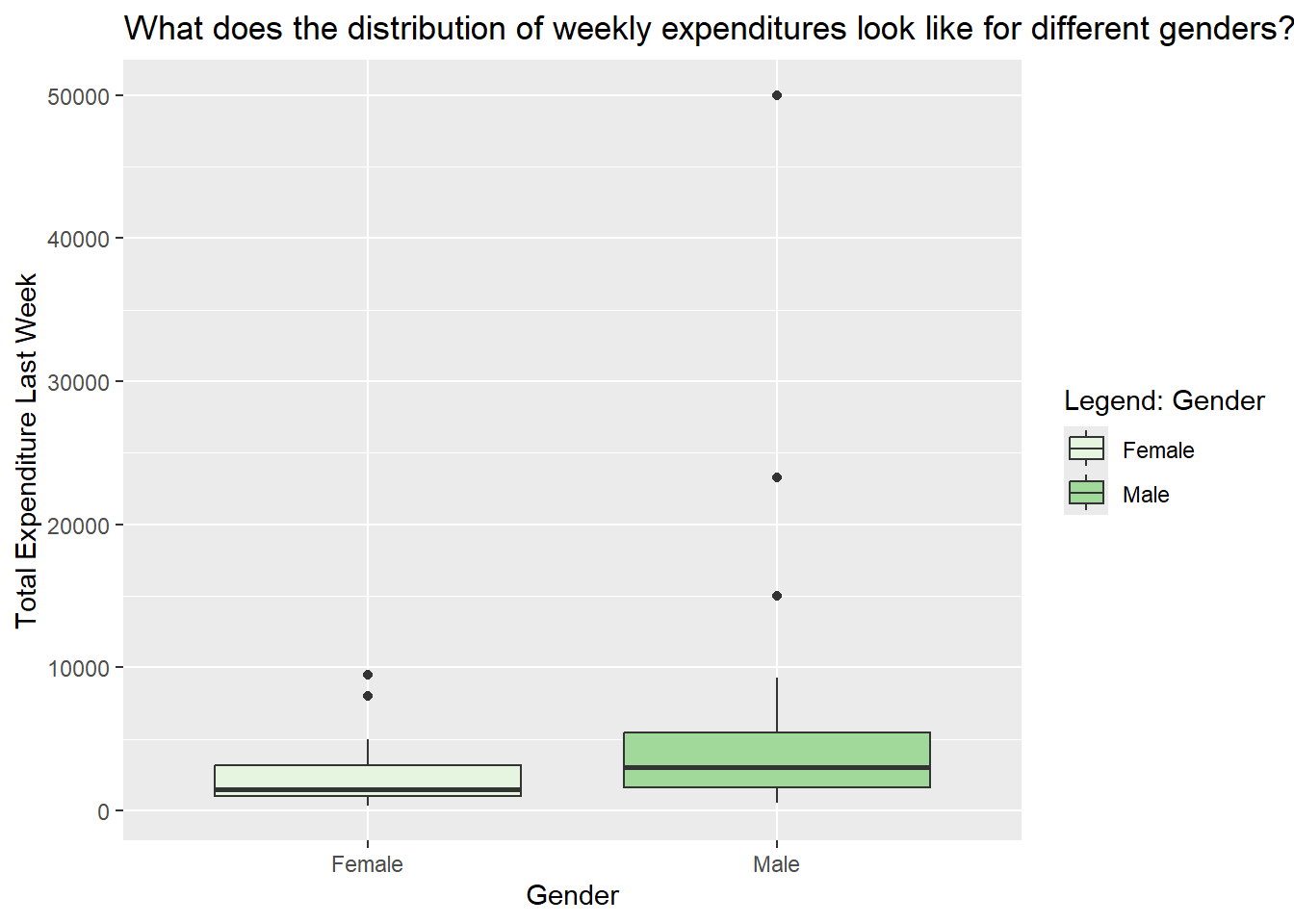
2. What does the distribution of weekly expenditures look like for different genders?
money_modified %>%gf_boxplot(total_expenditure_last_week ~ gender,fill =~gender,orientation ='x') %>%gf_labs(title ="What does the distribution of weekly expenditures look like for different genders?",x ="Gender",y ="Total Expenditure Last Week",fill ="Legend: Gender") %>%gf_refine(scale_fill_brewer(palette ="Greens"))
Inferences
Men, on average, tend to spend more than women, and there is greater variability in their spending habits, mainly because of the few men with very high expenditures. Female spending is generally more concentrated at the lower end, with fewer extreme high spenders.
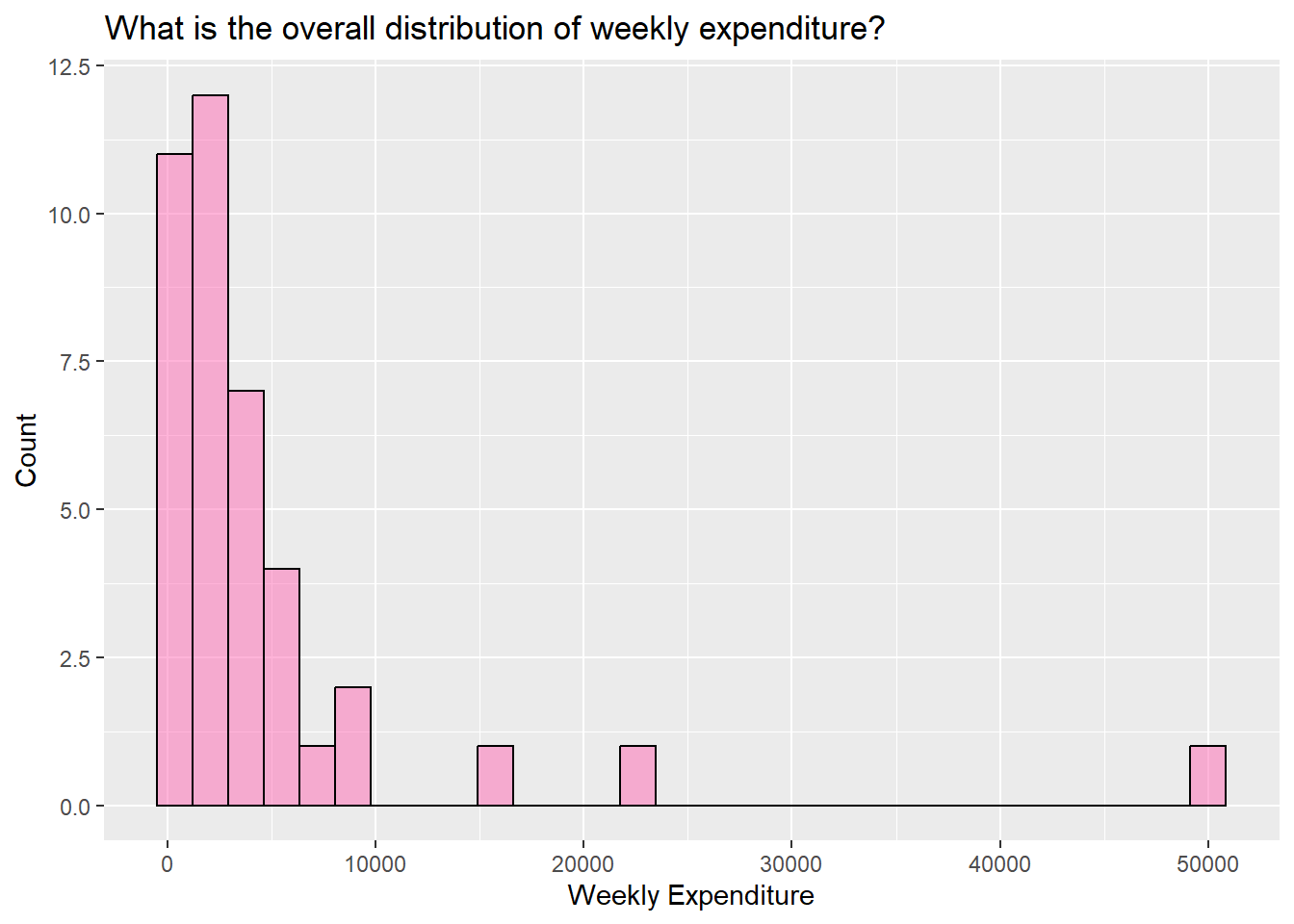
3. What is the overall distribution of weekly expenditure?
money%>%gf_histogram(~ total_expenditure_last_week,data = money_modified,fill ="#ff69b4", color ="black") %>%gf_labs(title ="What is the overall distribution of weekly expenditure?",x ="Weekly Expenditure",y ="Count")
`stat_bin()` using `bins = 30`. Pick better value `binwidth`.
Inferences
It is evident from the graph that the data is highly skewed. Most of the values are concentrated towards the lower end, with a few exceptions of extremely high values. Most expenditures lie between 0-10,000.
6. Summary of Inferences
People initially expected women to spend more, but the data shows the opposite- men have a higher average weekly expenditure. This result is influenced by a few male outliers, including one who spent 50,000 on an electronic device. Because of these extreme values, men’s spending shows much greater variability, while women’s spending remains more consistent and lower overall. The distribution is highly skewed, with most students spending between 0–10,000 and only a few reporting very high expenses. If the sample included different participants, the averages might look more similar.
7. Surprising Aspects
Even if we didn’t consider that one man who spent 50,000, the expenditures of other men were also significantly higher than that of women. What’s funny is that, almost all women were a little hesitant to tell us their expenditure, considering that it was too high and they felt a bit ashamed. Men on the other hand were more open with sharing their details, even though they were at least 3,000-4,000 more than what the women had said. Perhaps we could conclude another thing, that women are more conscious about their spending than men.
Since the p-value = 0.0009184396 is much smaller than 0.05, we reject the null hypothesis. The 95% confidence interval ([2108.431, 7558.314]) does not include 0. Thus, we can conclude that the average expenditure is significantly greater than 0.